


Key takeaways
- Karpenter Spot deployments can reduce Kubernetes costs by 59% with partial Spot configurations and up to 77% with all-Spot, according to the Cast AI 2025 Kubernetes Cost Benchmark.
- Setting
karpenter.sh/capacity-type: spotin a NodePool is the starting point, not the complete strategy. - Karpenter handles interruption natively via SQS and five EventBridge rules. Do not run Node Termination Handler (NTH) alongside it.
- A two-NodePool fallback pattern keeps workloads running when spot capacity dries up in a region.
- ML-based spot selection reduces interruptions proactively, before they reach your workloads.
Why spot with Karpenter cuts cost
Spot Instances use spare EC2 capacity that AWS makes available at a discount. Because it is spare capacity, AWS can reclaim it with two minutes’ notice. That interruption risk is why teams historically avoided spot for production workloads. Karpenter changes the equation by making it practical to manage spot at scale, with fast rescheduling and built-in fallback logic.
The savings are significant. According to the Cast AI 2025 Kubernetes Cost Benchmark, teams running a partial-spot configuration save an average of 59% on compute versus all-on-demand. Teams that shift entirely to spot save 77%. At 100 nodes with mid-range instance types, that gap represents tens of thousands of dollars per month. The savings do not require sacrificing reliability, provided the interruption handling is wired up correctly.
The table below compares on-demand and spot pricing across three common EKS instance types. Prices are indicative for us-east-1 and reflect typical mid-2025 spot market rates. Interruption frequency is approximate and varies by availability zone and time of day.
| Instance type | On-demand ($/hr) | Typical spot ($/hr) | Spot savings | Interruption frequency (stable AZ) |
|---|---|---|---|---|
| m5.xlarge | $0.192 | ~$0.058 | ~70% | Low (<5%) |
| c5.2xlarge | $0.340 | ~$0.088 | ~74% | Low to medium |
| m5.2xlarge | $0.384 | ~$0.110 | ~71% | Low (<5%) |
Before shifting heavily to spot, verify your AWS Savings Plans and Reserved Instance coverage. Spot usage does not consume Savings Plan commitments, so heavy spot adoption while maintaining large RI portfolios can result in wasted committed spend.
The key insight is that interruption frequency is not uniform. Specific instance types in specific availability zones maintain stable capacity for days or weeks, while others face reclamation within hours. That variance is exactly what smarter spot selection exploits. First, though, you need to configure Karpenter correctly for spot.
Configuring spot in a NodePool
If you are new to Karpenter’s resource model, the What is Karpenter overview covers the architecture. For a detailed walkthrough of all NodePool options, the NodePool configuration guide is a useful starting point before you deploy spot at scale.
The capacity type is set in the NodePool’s spec.template.spec.requirements block. Setting it to spot instructs Karpenter to request only spot capacity for nodes provisioned by that pool. In practice, you also want to allow multiple instance families so Karpenter can pivot when a specific type’s spot pool is exhausted in a region.
Spot NodePool YAML
apiVersion: karpenter.sh/v1
kind: NodePool
metadata:
  name: spot-general
spec:
  template:
    spec:
      requirements:
        - key: karpenter.sh/capacity-type
          operator: In
          values:
            - spot
        - key: kubernetes.io/arch
          operator: In
          values:
            - amd64
        - key: karpenter.k8s.aws/instance-category
          operator: In
          values:
            - c
            - m
            - r
        - key: karpenter.k8s.aws/instance-generation
          operator: Gt
          values:
            - "2"
      nodeClassRef:
        group: karpenter.k8s.aws
        kind: EC2NodeClass
        name: default
  disruption:
    consolidationPolicy: WhenEmptyOrUnderutilized
    consolidateAfter: 30s  # Aggressive -- use 5m or higher in production to avoid node churn
  limits:
    cpu: 1000
In production, 30 seconds is too aggressive for most spot workloads. Consolidation at 30-second intervals during traffic variation causes node churn — nodes provision, consolidation fires, load spikes, and new nodes provision again. Start with 5 minutes and tune down only after monitoring karpenter_voluntary_disruption_decisions_total to understand your actual consolidation frequency.
Several decisions in this config deserve explanation. The operator: Gt with values: ["2"] constraint selects generation 3 and above. Older instance families tend to have thinner spot markets and higher interruption rates, so excluding them improves stability. The instance-category requirement covers c, m, and r families, which gives Karpenter a wide pool to select from. Wider pools mean more fallback options when any single spot pool drains.
Karpenter uses EC2 Fleet with the Price Capacity Optimized (PCO) allocation strategy. PCO optimizes simultaneously for price and interruption likelihood — AWS selects from your specified instance pool the combination that balances cost against availability. This is why keeping your instance pool wide (using category constraints rather than specific instance types) matters: a larger candidate pool gives PCO more options to find low-interruption capacity.
Before migrating heavy workloads to spot, check your AWS Service Quotas for Running On-Demand Standard instances and Spot Instance Requests. Spot vCPU quotas are account-level and separate from On-Demand limits. If Karpenter cannot provision spot capacity at scale, confirm your spot vCPU quota is sufficient for your target scale. You can view and request quota increases in the AWS Service Quotas console under the EC2 service.
Multi-AZ topology spread
For multi-AZ resilience on spot, add topology spread constraints to your deployments:
topologySpreadConstraints:
  - maxSkew: 1
    topologyKey: topology.kubernetes.io/zone
    whenUnsatisfiable: DoNotSchedule  # Change to ScheduleAnyway for high-availability workloads
    labelSelector:
      matchLabels:
        app: my-app
This prevents all pods from landing in a single AZ and ensures that a single-AZ spot capacity event does not take down the entire deployment.
Note: whenUnsatisfiable: DoNotSchedule prevents scheduling if the spread cannot be satisfied — useful for strict AZ isolation. For workloads where availability matters more than zone balance, use whenUnsatisfiable: ScheduleAnyway instead. This allows pods to schedule even if spot capacity is depleted in one AZ.
For workloads that cannot tolerate interruption mid-task (batch ML training, long-running data pipelines), use the karpenter.sh/do-not-disrupt: 'true' annotation on pods:
metadata:
  annotations:
    karpenter.sh/do-not-disrupt: 'true'
This prevents Karpenter from voluntarily draining the node. It does not protect against actual AWS spot reclamation — for that, the SQS interruption queue is still required.
Additionally, Spot-to-Spot consolidation is disabled by default. If you want Karpenter to consolidate across spot instance types, for example moving from a more expensive spot type to a cheaper one as prices shift, enable it via the SpotToSpotConsolidation feature gate. That option increases node churn, so evaluate it against your workload’s restart tolerance before enabling it in production.
# In your karpenter values.yaml:
controller:
  featureGates:
    spotToSpotConsolidation: true
Verify the feature gate name against your installed Karpenter version, as the configuration path changed between v0.x and v1.x releases. The controller.featureGates nesting is required in current Helm chart versions.
Interruption handling and fallback
Karpenter includes native spot interruption handling. It works by watching an SQS queue that receives events from five EventBridge rules. When AWS signals an incoming interruption, Karpenter cordons and drains the affected node before the two-minute reclaim window closes.
The five EventBridge rules that feed the SQS queue are:
- EC2 Spot Interruption Warning – the primary two-minute reclaim notice from AWS
- EC2 Instance Rebalance Recommendation – an early advisory signal issued before the hard interrupt, giving additional lead time
- EC2 Instance State-change Notification – catches termination and stop transitions
- AWS Health Event – covers scheduled maintenance and hardware retirement notices
- EC2 Capacity Reservation Instance Interruption Warning – relevant when capacity reservations are used alongside spot
When Karpenter receives the Spot Interruption Warning, it immediately cordons the node and begins gracefully draining pods. Workloads reschedule to healthy nodes before AWS terminates the instance. The entire process is automatic, provided the SQS queue and EventBridge rules are configured during Karpenter installation using the Helm chart values or the CloudFormation stack in the official docs.
One detail that trips teams: the 2-minute spot interruption window is not infinite buffer. If your pods have long preStop hooks or SIGTERM handlers, configure terminationGracePeriod on the NodePool to match:
spec:
  template:
    spec:
      terminationGracePeriod: 120s
Karpenter uses this to schedule evictions within the available window. Without it, long-running shutdown sequences can be cut off.
One critical operational point: do not run AWS Node Termination Handler (NTH) alongside Karpenter’s interruption handling. Both tools react to the same SQS events and race to drain the same node. That race produces duplicate cordon and drain operations, which can leave pods stuck in a Terminating state. NTH was designed for clusters that lack Karpenter’s native handling. Remove NTH before enabling Karpenter’s interruption queue, not after.
To verify that interruption events are flowing correctly through the pipeline, check cluster-scoped events with:
# Captures cluster-scoped NodeClaim and NodePool events; -n karpenter misses these
kubectl get events -A --field-selector source=karpenter
Use the -A flag rather than -n karpenter. Interruption events are cluster-scoped, so a namespace filter will return nothing and give a false sense that no interruptions have occurred.
The two-NodePool fallback pattern
Spot capacity is regional and finite. During high-demand periods, the spot pool for a specific instance family in a given AZ can vanish entirely. A two-NodePool pattern handles this scenario without manual intervention and without leaving workloads unscheduled.
The pattern works like this: a primary spot NodePool has high scheduling priority. A secondary on-demand NodePool has low priority. Karpenter fills the spot NodePool first. When spot is unavailable, scheduling falls through to the on-demand NodePool. When spot capacity returns and consolidation runs, workloads migrate back to spot automatically.
---
apiVersion: karpenter.sh/v1
kind: NodePool
metadata:
  name: spot-primary
spec:
  weight: 100
  template:
    spec:
      requirements:
        - key: karpenter.sh/capacity-type
          operator: In
          values:
            - spot
        - key: karpenter.k8s.aws/instance-generation
          operator: Gt
          values:
            - "2"
      nodeClassRef:
        group: karpenter.k8s.aws
        kind: EC2NodeClass
        name: default
---
apiVersion: karpenter.sh/v1
kind: NodePool
metadata:
  name: on-demand-fallback
spec:
  weight: 1
  template:
    spec:
      requirements:
        - key: karpenter.sh/capacity-type
          operator: In
          values:
            - on-demand
        - key: karpenter.k8s.aws/instance-generation
          operator: Gt
          values:
            - "2"
      nodeClassRef:
        group: karpenter.k8s.aws
        kind: EC2NodeClass
        name: default
The weight field controls NodePool priority. A higher weight means Karpenter prefers that pool when multiple NodePools can satisfy a scheduling request. At weight 100 versus 1, the spot NodePool wins every time spot capacity is available. The on-demand pool acts as a safety net, not a default. This keeps your cost profile close to the spot baseline while maintaining availability during capacity events.
For additional production-grade patterns, including multi-AZ spread and workload-specific NodePool segmentation, the Karpenter best practices guide covers the operational detail.
Smarter spot selection
The two-NodePool pattern handles interruptions after they arrive. A complementary approach is to reduce interruptions before they happen by selecting instance types and availability zones that are statistically less likely to be reclaimed.
Cast AI’s Intelligent Spot feature applies ML models trained on historical interruption data across instance types, AZs, and time windows. Instead of treating all spot capacity as equally risky, it identifies pools that have maintained stable availability and routes workloads there first. When a pool’s interruption rate starts rising, it shifts workloads before the interruption notice arrives.
Measured results across production clusters show consistent improvement:
- 23.2% average reduction in spot interruptions on AWS
- 28.7% average reduction on Google Cloud Platform
- 40% average reduction on Azure
In the best-observed scenarios, the reduction reaches 94%. That range reflects real-world variance: clusters with flexible instance requirements benefit most because the model has a larger option space to route around unstable pools. Clusters constrained to a single instance type gain less because there is nowhere to route away from.
The practical consequence is that your spot NodePool runs longer between interruptions. Fewer interruptions mean fewer rescheduling events, less pressure on the on-demand fallback, and lower overall cost. The spot discount remains, but the operational overhead of managing interruptions drops significantly.
This matters more at scale than at small cluster sizes. At 20 nodes, an occasional spot interruption is a minor event. At 500 nodes with heavy workload churn, frequent interruptions create cascading rescheduling that wastes CPU cycles, increases scheduling latency, and raises the effective cost of the cluster. Reducing interruptions proactively becomes an infrastructure stability concern, not just a cost concern.
When automation goes further
At small scales, managing spot pools manually is workable. NodePool weights drift as instance availability shifts, consolidation behaves differently at 500 nodes than 50, and your ops team ends up spending time tuning Karpenter rather than shipping product.
Cast AI’s Karpenter Optimization layer sits above those primitives and manages them continuously. It combines ML-based spot selection with automated bin-packing, right-sizing, and NodePool management. Key capabilities include:
- Container live migration: Cast AI uses CRIU to checkpoint and restore running containers to cheaper or more stable spot capacity, enabling consolidation on workloads that previously required persistent scheduling. (Note: supported workload types and kernel requirements vary — see Cast AI documentation for compatibility details.)
- Intelligent Spot routing: ML models identify low-interruption pools across instance types and AZs, shifting workloads proactively before reclaim notices arrive.
- Automated bin-packing and right-sizing: Continuous reoptimization keeps utilization high as workload composition changes, without manual tuning cycles from your platform team.
Teams using Cast AI alongside Karpenter report compute savings in the 50-70% range (Cast AI 2025 Kubernetes Cost Benchmark), consistent with the benchmark numbers above. Unlike manual tuning, Cast AI maintains those savings automatically as cluster composition evolves, eliminating the need for your platform team to re-optimize periodically.
If you want to evaluate what this looks like against your own cluster, the Karpenter Optimization page includes a cost estimator and a path to a live demo with your actual workload data.
Frequently Asked Questions
Yes. You can include both spot and on-demand in the karpenter.sh/capacity-type values list within a single NodePool. However, the two-NodePool fallback pattern gives you more control. Separate pools let you set different weights, disruption policies, and limits for each capacity type, which is generally better for production clusters.
When Karpenter receives the EC2 Spot Interruption Warning, it cordons the node immediately and begins draining pods. Kubernetes drains pods with a PodDisruptionBudget according to the budget’s constraints. It evicts pods without a PodDisruptionBudget immediately. Karpenter then schedules replacements on available nodes before AWS terminates the instance. The entire sequence happens within the two-minute notice window, so workloads restart on healthy capacity without data loss for stateless applications.
Generally, no, not without additional safeguards. Stateful workloads that rely on local disk, maintain long-lived connections, or use leader-election patterns are poor candidates for spot nodes because even a two-minute drain window may not be enough for a clean handoff. If you need spot for cost reasons, consider using a dedicated on-demand NodePool for stateful workloads and a spot NodePool for stateless services. Use nodeSelector or node affinity rules to pin StatefulSets to the on-demand pool.
StatefulSets using ReadWriteOnce (EBS gp3/gp2) volumes require extra caution. EBS volumes are AZ-bound — if a spot interruption moves a StatefulSet pod to a different AZ, the pod will fail to mount its volume and remain Pending. For AZ-safe stateful spot workloads, use ReadWriteMany volumes (EFS, FSx) or ensure your StatefulSet has topology constraints that keep pods in the same AZ as their volumes.
Yes. PodDisruptionBudgets control how many pods from a deployment can be unavailable at one time during voluntary disruptions, including Karpenter’s drain. Without a PDB, Kubernetes can evict all replicas of a Deployment running on an interrupted node simultaneously, causing a service outage even as replacement pods start elsewhere. Set a PDB with minAvailable: 1 or maxUnavailable: 1 on any deployment that needs availability guarantees during spot interruptions.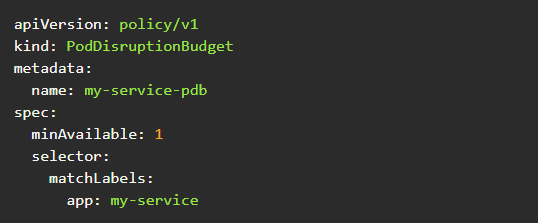
The PDB tells Karpenter (and the Kubernetes eviction API) not to evict pods if it would leave fewer than minAvailable running. Set minAvailable to 1 for at-least-one guarantees, or use maxUnavailable: 1 for at-most-one-at-a-time draining.
First, confirm the SQS queue and five EventBridge rules are created. You can check this in the AWS Console under SQS and EventBridge. Second, verify the Karpenter controller has the IAM permissions to read from the queue. Third, simulate an interruption event by publishing a test message to the SQS queue, or wait for a real interruption event and then run kubectl get events -A --field-selector source=karpenter to confirm Karpenter acted on it. The -A flag is required because these events are cluster-scoped.


