











Kubernetes Optimization

Workloads and nodes, tuned together

Keep costs low and reliability high — with any autoscaler you like.

  1. Read-only start
  2. No card required
  3. 30-day free trial
Workload optimizationPolicy active
1. Requests set from observed usage
api 4.0 → 1.5 vCPU
worker 8.0 → 4.2 vCPU
inference 12 → 4 GiB
RequestedUsedNew request
2. Pods repacked onto fewer nodes
Before: 6 nodes
After: 3 nodes
Spot
Node count follows demand, not peak requests6 → 3 nodes

Trusted by 2,100+ companies

  • Akamai
  • Yotpo
  • Iterable
  • NielsenIQ
  • Swisscom
  • Kakao
  • FICO
  • BMW Group
  • Hugging Face
  • ShareChat
  • WeWork
  • Cisco
  • PlayPlay
  • Roku

Idle capacity on one namespace. Starved workloads on the other.

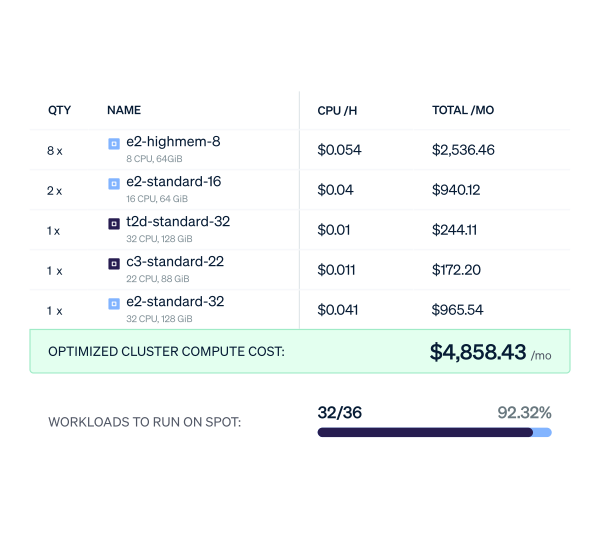
Cast AI sets each workload’s CPU and memory requests from observed usage, then bin-packs pods onto fewer, better-fitting nodes and moves eligible workloads to spot instances. Your node types and count follow real-time demand instead of peak requests – even if you keep Cluster Autoscaler or Karpenter.

50–80%

Banking Circle cut Kubernetes costs

Read the story

One platform, all layers optimized

The workload and node layers as one system: right-size workloads, provision nodes your way, keep capacity efficient as demand moves, and verify every change in Cast Radar.

One loop, not two tools

Workload recommendations set how much capacity your pods need, which drives node size, packing and placement. Node pressure and free capacity feed back into workload changes and out-of-memory recovery. Cast AI connects the two, so a rebalance can take pending recommendations into account.

Workload optimizationPolicy active
1. Requests set from observed usage
api 4.0 → 1.5 vCPU
worker 8.0 → 4.2 vCPU
inference 12 → 4 GiB
RequestedUsedNew request
2. Pods repacked onto fewer nodes
Before: 6 nodes
After: 3 nodes
Spot
Node count follows demand, not peak requests6 → 3 nodes

Three ways to provision nodes. Choose one.

Cast AI chooses the most efficient nodes for your workloads at any moment, even when you keep Cluster Autoscaler or Karpenter. Node-level features depend on the path you select:

  • Cluster autoscaler. Keep it. Cast AI right-sizes and bin-packs workloads, so node provisioning follows what your applications need.
  • Karpenter. Keep it. Cast AI’s Karpenter Enterprise Suite adds workload right-sizing, rebalancing across NodePools, container live migration, cost visibility, and commitment use on AWS. Karpenter keeps provisioning nodes. When you turn on Cast AI rebalancing, it takes over Karpenter’s cost-driven consolidation and respects your disruption budgets. Available on EKS and AKS.
  • Cast AI autoscaler. Use it for node provisioning, consolidation, rebalancing and supported purchasing strategies. It runs the same way across AWS, GCP and Azure.

No more overprovisioning

Guesswork pod requests are the most common waste in Kubernetes. Cast AI keeps them accurate, tuning them by what your pods really use, plus the headroom you define. The recommendations’ apply path depends on your Kubernetes version, autoscaling settings, and disruption policies.

  • CPU, RAM, and replicas. Adjusts requests from usage and policy, and reconcile them with your HPA or KEDA scaling.
  • JVM-aware memory. For Java workloads, monitors heap usage, garbage collection, and thread metrics rather than container memory alone.
  • Startup to steady state. Keeps the higher CPU setting a workload needs during startup, then switches to the lower steady-state setting.
  • In-place resizing. Changes CPU and memory on running pods when Kubernetes (1.33 and on) and the workload allow it. Changes that require a restart follow your rollout policy.
  • Zero downtime for single-replica workloads. For eligible Deployments, adds a replica, and once ready removes the original.
  • Auto-recovery. Recovers from OOMKills and node memory pressure automatically. You choose when changes go out: right away, at the next natural restart, or on a schedule you set.

Keep capacity efficient as the cluster changes

Demand moves by the hour. Cast AI keeps capacity efficient as it moves: pack tighter, replace better, buy cheaper, within your policies.

  • Packing and consolidation. Move eligible pods onto fewer nodes and remove excess capacity. With Cast AI’s autoscaler, consolidation runs continuously and rebalancing runs on a schedule or on demand.
  • Instance selection and replacement. Choose capacity for your workload requirements and replace eligible nodes as demand and policy change.
  • Commitments. Account for Reserved Instances, Savings Plans, and CUDs where your path supports it.
  • Spot. Choose spot capacity using reliability signals, spot at-risk nodes, and prepare replacements early. Fall back to on-demand where supported.
  • Hibernation. Scale eligible idle environments to zero worker nodes and resume later. The control plane stays, and its charges and storage charges can continue.

Chat with your cluster data

Built-in visual and conversational paths, coupling your cluster cost with performance and reliability metrics.

  • Cast Radar. See cost by cluster, namespace and workload, next to throughput, error rate and latency (P50, P95, P99). One year of history, period comparisons, and CSV export to your own tools. Track cost, utilization, OOMKills, spot interruptions and CPU throttling to see the automation’s impact on your container estate. The result of every change feeds back as new recommendations, closing the loop.
  • CastPilot. Ask what changed, why a workload is expensive, or which optimization to start with, and get an answer in plain English from live cluster data, inside the console. CastPilot shows the generated policy and reasoning behind each recommendation.
  • MCP server. Connect your own AI agents to CAST’s cloud context and reasoning through MCP, not another set of API calls. They get the same cost, health and recommendation data your dashboards show.
Cast RadarSelected clusters
Cluster cost
$90,219.34/mo
10.02% lower
LatencyError rate Stable
P508.14 ms
P9564.32 ms
P99580.23 ms

Read-only, review, automate

  1. Connect

    Run one script to deploy a read-only agent. It analyzes your cluster and changes nothing.

  2. Review

    Look at utilization, recommendations and disruption patterns, then select Optimize Now and pick a profile. Cast AI drafts policies for your workloads and nodes, and you can protect any namespace before you move on.

  3. Apply and verify

    Apply the plan when you’re happy with it, then check cost, error rate and latency in Cast Radar before you expand.

Works with your existing Cluster Autoscaler, Karpenter, HPA, KEDA

Deploy on EKS, GKE, AKS, install with Terraform or Helm, observe with Prometheus or Grafana, and run on-premises through Cast AI Anywhere.

01
See where capacity is idle

Six workloads sit across four partially used nodes.

Resources usedResources requested
6 workloads4 active nodes

More built in

The jobs that usually need another tool or a manual runbook, built into the same platform.

Container live migration

Eligible Kubernetes StatefulSet pods can maintain their network identity, attached persistent volumes, and in-flight connections with minimal disruption.

Keep EKS add-ons current

Cast AI shows which add-ons are outdated or blocking your next Kubernetes upgrade. You can opt in to managed upgrades with automatic rollback if a health check fails. Works with or without Karpenter Enterprise Suite.

DaemonSet scaling

Size DaemonSet CPU and memory requests per node group instead of applying one static request everywhere, so node agents, monitoring, eBPF, and log collection pods get the resources they need without overprovisioning smaller nodes.

GPU optimization

For GPU workloads, Cast AI analyzes compute, memory, and bandwidth usage, then recommends rightsizing, and applies GPU time-slicing for eligible workloads.

Choose how to start

Start read-only, see what other teams got, or talk to an expert about your setup.

Your questions,
answered

Can’t find what you’re looking for?

Contact us
Does Cast AI replace Cluster Autoscaler or Karpenter?

Not necessarily. For those wanting a unified solution, Cast AI’s full platform includes a proprietary node autoscaler. However, you can also deploy Cast AI as an additive layer on top of Karpenter in your EKS or AKS setup. Karpenter will keep handling node provisioning, while Cast AI’s Karpenter Enterprise Suite powers it with workload optimization, operational controls, and cost/reliability monitoring Karpenter does not provide on its own.

We already use Karpenter. What does Cast AI add?

Cast AI’s Karpenter Enterprise Suite acts as the optimization layer that guides Karpenter to make efficient, production-safe autoscaling decisions, such as: Workloads right-sizing based on real usage plus configured headroom, rebalancing across NodePools, live migration for eligible stateful workloads, Reserved Instance and Savings Plan use on AWS, spot handling with early replacements and on-demand fallback, and EKS add-on and upgrade upkeep. Karpenter keeps provisioning nodes. Available on EKS and AKS.

Do I have to change HPA or KEDA?

No. Cast AI reconciles horizontal and vertical recommendations so they don’t conflict.

What happens before I enable anything?

The Cast AI agent is read-only. If you start with Cast Radar, you’ll be able to monitor your clusters’ cost and reliability metrics. If you start with Kubernetes Optimization, you will see recommendations first. Only once you’re ready to roll out automation, you will choose the node autoscaler, policies, and eligible workloads – so you control what automation can and cannot touch.

How does Cast AI apply changes safely?

It uses in-place resizing where Kubernetes supports it, your rollout and disruption policies, maintenance windows for deferred changes, and live migration for eligible workloads.

Which environments does it support?

EKS, GKE, AKS, OKE and on-premises through Cast AI Anywhere. Karpenter Enterprise Suite runs on EKS and AKS. Commitments are AWS only, and EKS add-on management is EKS only. Node features vary by autoscaler.

What are the limits?

In-place resizing needs Kubernetes 1.33 or later. The single-replica path excludes workloads with PVCs. Live migration is for supported workloads. Spot capacity can still be interrupted. Hibernation leaves control-plane and storage charges.

#1 on G2262 reviews

Connect your cluster

Read-only until you enable changes.