
GPU capacity, wherever it actually exists
OMNI Compute extends your Kubernetes cluster into GPU capacity across clouds and regions, so workloads run where GPUs are available, not just where your account happens to be. No refactoring. No new platform to manage.

Trusted by 2100+ companies globally



Problem
The problem with single-cloud GPU access

GPU capacity is concentrated, not distributed
The GPUs you need are rarely available in your region, your cloud, or your existing contract at the exact moment you need them. Roadmaps stall waiting on one provider.

Manual multi-cloud sourcing doesn’t scale
Sourcing, provisioning, and coordinating GPU nodes across providers by hand turns your infrastructure team into full-time GPU brokers.

Workloads can’t just relocate
Refactoring applications to run wherever capacity exists isn’t realistic for most teams. So they wait instead of shipping.
Key features
GPU capacity, wherever it lives
One cluster, your existing GPU capacity
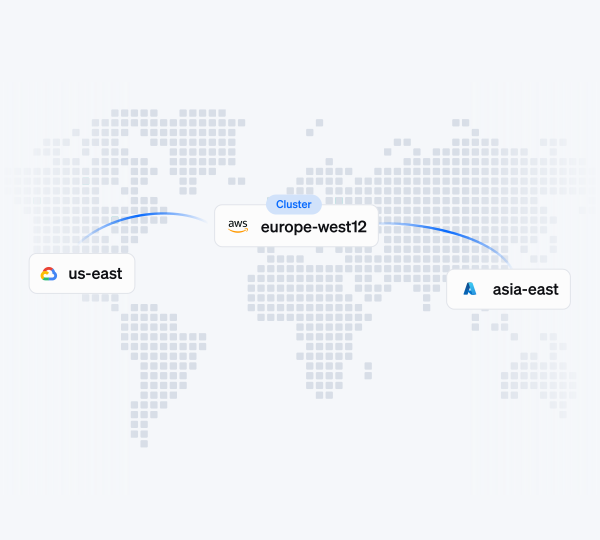
Connect reserved capacity in other accounts, private cloud nodes, or your own infrastructure to your existing Kubernetes cluster. Cast AI manages placement and sharing. You keep your existing contracts and providers.
Secure, Kubernetes-native connectivity
Remote GPU nodes connect back to your cluster through Crossplane and CRD-based provisioning, live and tested today, with full Terraform support for setup. No proprietary control plane. No change to how your workloads request resources.
Built for when capacity, not cost, is the constraint
When GPUs simply aren’t available in your region, that’s a sourcing and coordination problem, not a cost-optimization one, and most teams can’t solve it manually at scale. OMNI Compute exists to reach GPU capacity your team couldn’t get to on its own.

Time-slicing
Share GPUs across multiple workloads using temporal partitioning. Configure 1 to 48 replicas per GPU to match workload density requirements.
MIG partitioning
Divide A100, A30, and H100 GPUs into physically isolated instances. Each partition has dedicated compute cores and memory with no noisy neighbors.
Dynamic resource allocation
Define what you need with Kubernetes-native ResourceClaims, and Cast AI provisions matching hardware automatically.
Global GPU capacity
Source GPU nodes from any region or cloud provider. OMNI handles provisioning and setup, so remote GPUs appear as native cluster nodes.
GPU-optimized bin-packing
Placement algorithm that accounts for GPU sharing, MIG partitions, and workload requirements. Maximize node utilization before scaling out.
GPU metrics & cost attribution
Track GPU utilization per workload, attribute costs to teams or apps, and spot idle capacity with optimization recommendations.
Setup
Get started in four steps

Select your provider and run a single script to deploy lightweight agents that will analyze and optimize your cluster.

Choose the best regions based on availability, latency, and costs. Add it to your existing cluster.

Set your node templates and let Cast AI optimize your cluster automatically.

Deploy AI Workloads anywhere and keep your cluster optimized.
Case study
Akamai achieves 40-70% cloud savings, boosts engineer productivity
“I had an aha moment – an iPhone moment – with Cast. Literally two minutes into the integration, we saw the cost analytics, and I had an insight into something I had never had before and had tried to get for a very long time.”

Dekel Shavit
Sr. Director of Engineering
Case study
Yotpo automates Spot Instances, cuts 40% in cloud costs and saves time
“And with Cast AI, we didn’t do anything. Like, we didn’t do the move before, we didn’t do the move after. So there was a lot of human resources and time saved here. That was a very good experience. And again, from a cost perspective, it was highly optimized.”

Achi Solomon
Director of DevOps
Case study
Bede Gaming automatically optimizes K8s workloads with no risk to performance
“In my mind, it’s one less thing to worry about, and therefore teams can be focused on other things of potentially higher value. So having [Cast AI] just run in the background with a good level of confidence that we’re running as efficiently as we can, balancing the service that we’re providing – that’s great.”

Dan Whiteley
Chief Technology Officer
Learn more
Additional resources

Report
2025 Kubernetes GPU Trends & Cost Report
Real data on GPU availability, pricing patterns, and performance insights across clouds.

Blog
GPU Cost Optimization: How to Reduce Costs with GPU Sharing and Automation
GPU costs are skyrocketing as more teams run AI and ML workloads. Discover how GPU…

Blog
GPU Shortage Mitigation: How to Harness the Cloud Automation Advantage
Training AI models has never been buzzier – and more challenging due to the current…
FAQ
Your questions, answered
No. Remote GPU nodes join your existing cluster as native Kubernetes nodes.
Through Crossplane and CRD-based provisioning over a secure WireGuard connection, with full Terraform support for setup.
Not yet. Onboarding today is hands-on with our team, with self-service coming soon.
OMNI’s core value is reaching GPU capacity you couldn’t get to on your own. Cost efficiency can follow, but that’s not the primary promise.
Yes. If you already have the capacity you need, Cast AI can manage placement, sharing, and visibility without sourcing GPUs on your behalf.
Can’t find what you’re looking for?

4.8/5 50+ reviews