


You probably know the catch with EC2 Spot Instances. Whether it’s AWS, Azure, or Google Cloud Platform, the cloud provider can terminate an instance at any time with as little as a 30-second to 2-minute notice.
This doesn’t mean that you should give up and go for reservations instead. There is a way to use EC2 Spot Instances effectively. That’s right, even for production workloads.
The solution? Automation.
Read this guide to learn how to run workloads on Spot Instances in a reliable and cost-effective way.
What is a Spot Instance?
A Spot Instance is a sort of cloud computing instance that allows users to bid on unused Amazon EC2 (or other cloud provider) capacity at a reduced price, possibly saving up to 90% off On-Demand pricing.
Teams often consider them as a good way to reduce costs for fault-tolerant applications that can tolerate interruptions. That’s because the cloud provider can recover capacity with little notice if the spot price exceeds the user’s bid.
According to our 2025 Kubernetes Cost Benchmark Report, clusters with a mix of On-Demand and Spot Instances recorded an average savings of 59%, while clusters running only Spot Instances scored a 77% reduction on average.
Why are Spot Instances so tricky to manage?
Interruptions are inevitable
Cloud providers offer their unused capacity at prices that offer savings of up to 90%. The only catch is that they can pull the plug at short notice, from 2 minutes to as little as 30 seconds.
Since you bid on spare computing resources, you have no guarantee of how long these capacities will stay available. Interruptions are bound to happen. This is why Spot Instances are challenging to manage, and the prospect of interruptions prevents teams from using these cost-efficient resources for production workloads.
Pulling the plug happens fast
Cloud providers offer a short interruption notice. Amazon gives you 2 minutes, while Azure and Google only 30 seconds. Is that enough time to drop everything and find a replacement for your instance? Not for a human.
Let’s say that you have already set your eyes on an On-Demand Instance. Creating a new compute instance takes around 5 minutes on AWS (and even longer if you use Kubernetes), so you’re looking at a few minutes of potential downtime.
Another method is to have some paused machines that can step in whenever you lose an instance. However, this approach will significantly reduce your potential savings. The best way to handle Spot Instance interruptions is through automation.
Limited capacity
The amount of compute capacity sold as Spot Instances can vary greatly based on size, region, time of day, and other factors, all of which are subject to frequent changes.
The availability of a Spot Instance is based on supply and demand. Selecting the most popular instance types during a market surge, such as on Black Friday, could result in unexpected behavior.
So, why should you use Spot Instances at all?
Some of your workloads probably don’t need on-demand machines at all times. Tech companies like Salesforce, Lyft, or AutoDesk use Spot Instances.
If you still have some doubts, consider this scenario:
Let’s say that you have ten pods running for your application – a product catalog service. Half of the pods are running on an EC2 Spot Instance.
At some point, the instance gives you a preemption notice. Your instance is about to be taken away from you. If that happens, you’ll lose half of your capacity. You’re not going to experience downtime immediately. Instead, the pods will be redistributed to other machines that are still available after the interruption.
But what if you want to stay ahead of the interruption and replace that capacity before it impacts performance?
Within the notice period, you could launch a new instance — perhaps a different Spot type — or switch to an On-Demand Instance if Spot capacity isn’t available.
Once market pressure eases, you can swap that On-Demand Instance back to a Spot Instance to reduce costs.
Is using a Spot Instance a good idea? Take a look here to learn more: How to find out exactly how much you can save with Spot Instances.
When to use Spot Instances
If a service is stateless and can be scaled out – that is, has more than one replica – it is a good candidate for EC2 Spot Instances.
The good news is that most services in modern architectures are stateless, and Kubernetes was built with that in mind.
Here are some examples of workloads that work well in Spot Instances:
- Batch processing jobs: They’re fault-tolerant and instance-flexible.
- Containers and microservices: They’re typically self-contained, highly available, fault-tolerant, and capable of handling interruptions.
- High Performance Computing (HPC): These apps usually need very high compute capabilities, massive amounts of memory, fast storage, and high network performance. Spot Instances can support them via bursting or even serve as primary compute infrastructure.
- CI/CD operations: It doesn’t matter what tools you use; these instances can come in handy in your deployment process.
- Distributed databases: Elasticsearch or MongoDB can handle an interruption without losing any data or affecting the service.
- Any application in an orchestrated environment
Our 2025 Kubernetes Cost Benchmark Report showed that Spot Instance interruption rates are different across AWS, Microsoft Azure, and Google Cloud Platform. AWS has the greatest overall interruption rate throughout shorter periods of time, with more than half of the disruptions happening in the first hour of a node’s life. Azure is more stable since it has fewer disruptions across all time periods, especially in the first 12 hours.
Which cloud provider should you choose for Spot Instances?

Do this before getting a Spot Instance
Know your workload requirements
Before getting into the Spot Instance business, you need to know how much time your application takes to finish a job. Can it handle interruptions well? Will you have an automation tool to transfer your workload before time runs out?
Select the right Spot Instance
Next, it’s time to examine the cloud provider’s offer. Take a look around and consider going for slightly less popular EC2 Spot Instances. They might come with a lower chance of interruptions and run stably for a longer time.
Tip: Use the Spot Instance Availability Map. It shows real-time Spot instance interruptions, insufficient capacity events, and pricing across AWS, Azure, and GCP.
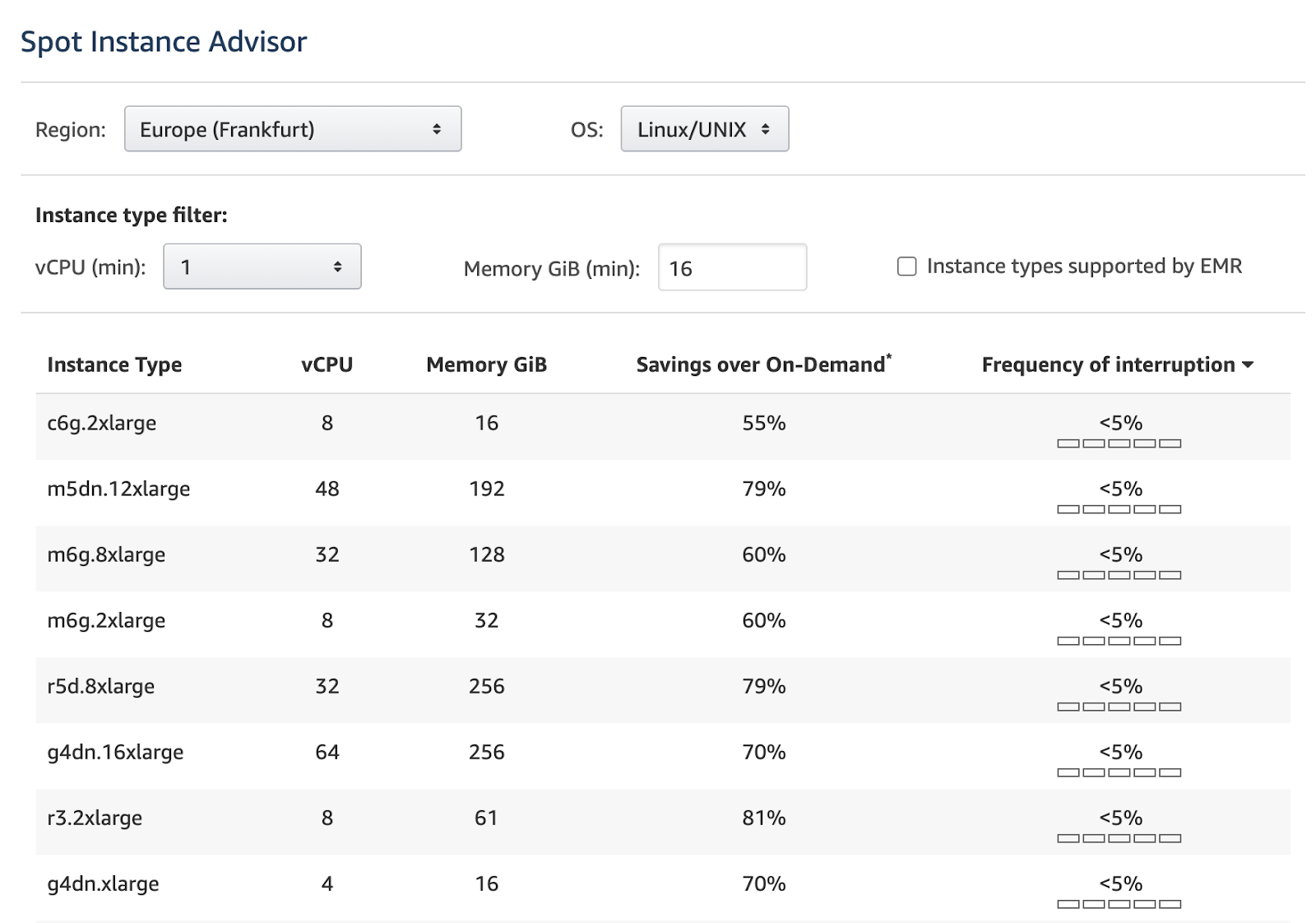
When looking through the available instances, check the frequency of interruption. It’s the rate at which the instance reclaimed capacity during the trailing month. Spot Instance interruptions contribute to the complexity of this instance type, making it a crucial step in your process.
AWS displays the frequency of interruption in the Spot Instance Advisor using ranges of <5%, 5-10%, 10-15%, 15-20%, and >20%:
Bid your price
Now it’s time to set the maximum price you’re willing to pay for the Spot Instance. Setting the right Spot price is key because your instance will run only when the marketplace Spot price matches your bid or is lower.
The rule of thumb here is to use the maximum price that equals the On-Demand price.
If you set a custom amount and the price goes up, you risk getting interrupted.
Manage Spot Instances in groups
When using groups of Spot Instances, you can request multiple instance types at the same time. As a result, you increase your chances of getting filled.
Another perk is that you can set a maximum price per hour for the entire fleet rather than a given Spot pool (a group of instances with the same type, OS, availability zone, and network platform).
- AWS Spot Fleet: Manage a large fleet of Spot Instances with different allocation strategies (for example, considering the lowest price or only capacity-optimized types).
- Azure VM scale set: Use this feature to create and manage a group of load-balanced VMs, automatically increasing or decreasing their number.
- Google managed instance group: After specifying the preemptible option in the instance template, Spot VMs can be brought together in a group.
To make it all work, prepare for a massive number of manual configuration, setup, and maintenance tasks.
Turn to automation
You can avoid downtime from lost instances by implementing automation tools for managing your cloud infrastructure via autoscaling methods.
By using an automation solution, you can pick how much of your workload will be running on a Spot Instance and then automatically fall back to On-Demand Instances in case of interruptions.
Automation ensures that your workload has a place to run. Thanks to features like AWS Rebalance events, you can mitigate the risk even before receiving the interrupt notice.
You can get away with adding some basic levels of automation to how you manage these instances. But to achieve the best results, you need a solution that carries out automated actions based on predictive analytics.
Success story: Wio Bank
Wio Bank aimed to boost its profitability by improving the efficiency of its cloud infrastructure and lowering cloud costs while maintaining performance.
The organization initially employed cost monitoring and recommendation technologies but quickly realized that they lacked the capacity to automatically apply recommendations and reduce cloud expenses in real time. Wio Bank implemented Cast AI automation in its non-production environment and then confidently moved to the production environment.
Thanks to Cast, Wio Bank can now run 90% of its non-production environments on Spot VMs, resulting in significant cost savings – as displayed in this cluster example:

Read the full success story →
Wrap up
An automation solution like Cast AI is needed to reap the pricing benefits of Spot Instances and safely use them in production.
Wondering how it all works? Read this: How to reduce your Amazon EKS costs by half in 15 minutes.
Kubernetes cost optimization
Monitor resource spending, automate resource allocation, and scale instantly with zero downtime.


